Google Chrome Extensions are browser extensions that modify the Google Chrome browser. These extensions are written using web technologies like HTML, JavaScript, and CSS.
Google Chrome Extensions for biology students are downloadable through the Chrome Web Store (formerly the Google Chrome Extensions Gallery). Over 2,200 extensions have been published by developers.
All users with a Google Account are able to add extensions after developing them.
- Alpha Oxidation of Fatty Acids
- Amino Acid Transport and Regulation
- Artificial Intelligence in Biochemistry
- Chemical Bonding in Biomolecules
Best Google Chrome Extensions for Biology Students
From the Google Chrome web store, we are selecting the best and most useful BIOLOGY extensions listed below.
1. BIODIGITAL HUMAN
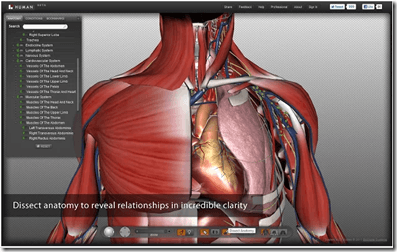
The BioDigital Human is a 3D platform that simplifies the understanding of anatomy, disease, and treatments.
Explore the body in 3D! The BioDigital Human is a 3D platform that simplifies the understanding of anatomy, disease, and treatments.
Interactive tools allow you to explore, dissect, and share custom views. These tools, combined with detailed medical descriptions, provide an unprecedented visual format. This format helps you learn about your body.
Nearly 1,381,841 users are using.
This app uses the exciting new web standard for 3D – WebGL. At this time, not all graphics cards are supported. To verify your computer supports WebGL, a quick test is available.
Chrome Extension | Android App | Source link
2. Human Body
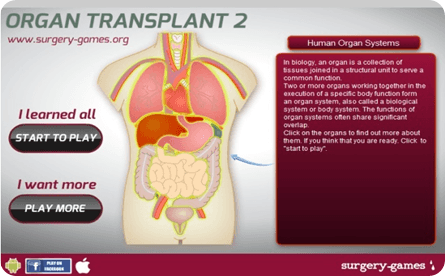
Human Body application is a kind of educational game that can be easily played every age. Human Body application is a kind of educational game that can be easily play every age.
In biology, an organ is a collection of tissues joined in a structural unit to serve a common function. Two or more organs work together to execute a specific body function. They form an organ system. An organ system is also called a biological system or body system.
Now nearly 7,402 users are using this. The functions of body systems often share significant overlap. Click the organs to find out more about them. If you think that you are ready, click the start to play.
3. ChemReference: Periodic Table
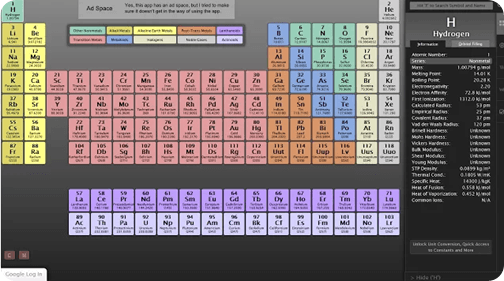
Powerful periodic table and chemistry reference tool. NOTE: If you’ve had trouble getting chemreference.com to show up on December 5th, you’re not alone.
My hosting service was at fault, but has since resolved the problem.
Sorry for the inconvenience, guys. On a related note, I’m strongly considering switching hosts.
ChemReference is a detailed and powerful periodic table. It is designed for power users who need information at their fingertips.
Features Include
- Auto-scaling periodic table to take advantage of the space of your browser window
- Fully searchable with real-time highlighting of matched elements
- Very quickly navigable with keyboard shortcuts for common actions
- Trend highlighting for all properties of elements with color-weighted trends
- Visual orbital-filling representation
- Quick links to Wikipedia and Web Elements for further element information
- High contrast mode for increased readability
Chrome Extension | Source
4. Biology Cell Puzzle
Biology is the most important branch of science. The Biology cell puzzle is a simple Chrome extension. It allows users to place the organelles in the correct positions within the specified files. This is the puzzle-based games Chrome extension.
While you are playing biology games, you can find many objects related to biology. You can play the games from your Chrome browser without leaving your working pages.
For example, cells, viruses, and bacteria. There are also multicellular life forms, spermatozoa, and plants. Organelles and chlorophyll are included. The material of genetics, like DNA thread, RNA Thread, and ribosomal proteins are essential. Lastly, there are vitamins and more.
Chrome Extension | Source
5. BaCON
BaCon is a Chrome extension. It provides you with access to a wide range of bioinformatics tools. These tools are available in a helpful right-click context menu. Whenever you choose a sequence with your mouse and right-click on the choice, the BaCON menu appears. It includes many tools for both nucleotide sequences and protein sequences.
The tools you need in the menu are fully customizable. They include many generally used tools. Examples are BLAST and many tools of the EMBOSS package. BaCON allows you to use these tools directly when you find an exciting sequence. You don’t need to save it to a file or find the right website to access your data.
To use BaCON, mark the sequence, right-click, and select your tool. That’s all there is to it.
6. Genetic.Family

Comprehend your DNA across AncestryDNA, MyHeritage DNA, 23andMe, FTDNA, and GEDmatch. Upload and Show your Matches.
Interested in using your DNA data and incorporating everything together.
Take a look at the info from Ancestry, MyHeritage, 23andMe, FTDNA, and GEDmatch is a whole brand-new method.
Recently added an addition to seeing your DNA info on WikiTree.
Likewise enables you to rapidly alter your privacy settings on GEDmatch for all of your sets.
7. Virtual Yeast Cell
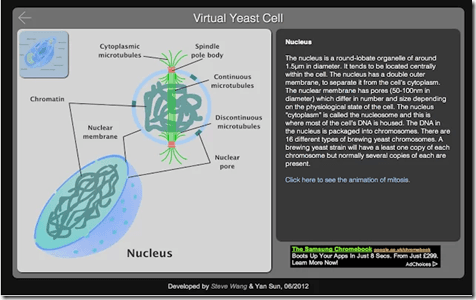
View a virtual yeast cell with details of cell organelles and animation.
A fantastic web app for students helps you learn the basic structure of a yeast cell.
Tap the label on the cell, and the sub-structures will be expanded with images and explanations.
Some animation clips are available for more vivid representations.
Chrome Extension | Source
8. Basic Microbiology Lab Techniques Lite
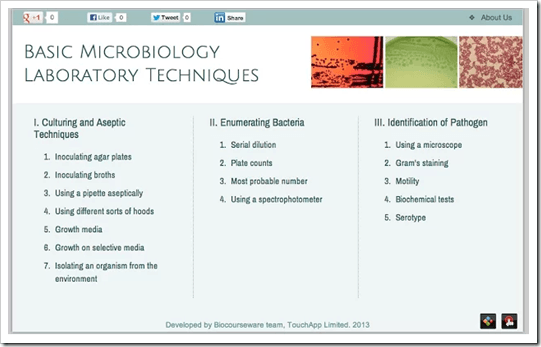
An interactive multimedia textbook for basic Microbiology lab techniques.
This multimedia textbook is composed of three parts. It contains sixteen chapters of content, though not all are available for the lite version. These chapters provide an overview of how to operate on microorganisms. The topics include culturing, enumerating, and identification.
Contextual animations in each section give users good illustrations of technical details and related theories. Video demonstrations bring users an in situ experience of doing experiments in the laboratory.
All text contents are audible, which helps users to learn microbiological terms easily.
It provides a unique approach for life science professionals. University and college students can also grasp microbiology lab techniques. They can do this anywhere and anytime.
Chrome Extension | Source
9. Focus on Plant Lite
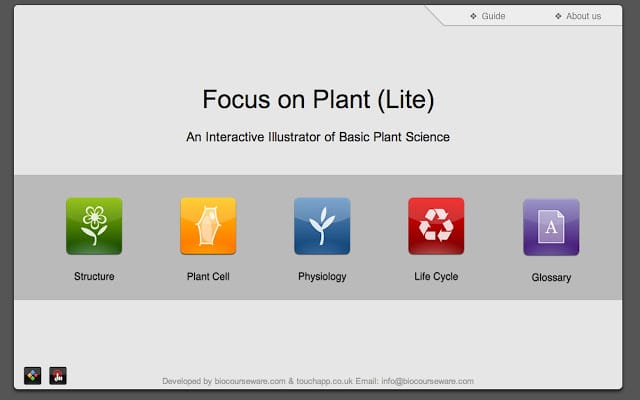
This educational app assists users in learning the basic knowledge of Plant Science. It provides an easy way to understand the subject.
The content of the app covers the four basic areas of Plant Science. These areas include the plant parts, the plant cell, the plant physiology, and the life cycle of plants.
Designed with beautiful interactive illustrations and charts, the app makes learning touchable and fun.
The app is integrated with an Audible Plant Science glossary. It can help users learn the details of knowledge. Users can also learn the pronunciation of scientific terms.
Focus on Plant app could be a useful reference for both students and teachers. It is also suitable for people who are interested in plants, gardening, and botany.
Discover more from Biochemistry Den
Subscribe to get the latest posts sent to your email.